Showing newest 33 of 54 posts from May 2009. Show older posts

Sunday, May 31, 2009

Windows 7: Free online training

Bookmark and Share

http://www.microsoft.com/learning/windows-7/default.mspx

Few Windows 7 free course available online at,

+ Clinic 10077: What's New in Windows 7 for IT Professionals (free)
+ Clinic 10125: What's New in Windows 7 for Consumers (free)
+ Clinic 10088: What's New in Windows 7 for Information Workers (free)

Yahoo! 360° to close and new Yahoo! Profiles launches

Bookmark and Share

Google has recently added profiles and vanity URLs to its services to improve its position in social networking. Now one more player, Yahoo!, has entered into the bandwagon by improving its old Yahoo! profiles pages.

Yesterday, I have received email that Yahoo! 360° service is closing and asking its users to head over to new Yahoo! profiles.

Yahoo! 360° closes and improves Yahoo! Profiles.

New Yahoo! profiles provides platform for improving social network using Yahoo! services. Users can now create connections, share feeds and updates similar to Friendfeed, create blogs etc.

IMO, Yahoo! will integrate its different services such as mail, answers around its Yahoo! profiles to provide more intuitive social experience.

But real question is that how many of us used old Yahoo profiles? Are you going to use new Yahoo Profiles?

Saturday, May 30, 2009

Bing: An Interactive webcast on June 1st @ 10am PT

Bookmark and Share

There will be an interactive webcast on Bing search engine and its features. The webcast will walk through all features of Bing search engine.

So when will it be available?
+ It will be live on 10AM Pacific Daylight Time, Monday, Jun 1st at http://ms.istreamplanet.com/search

Read original blog entry.

Friday, May 29, 2009

Technical Fun: An "Intel Star" Sponsors of Tomorrow

Bookmark and Share

I just found this Ad on channelintel on YouTube.

Bing: a Live search engine upgrade from Microsoft

Bookmark and Share

Bing: a Live search engine upgrade from Microsoft

Microsoft (MSFT) announced an upgrade to its (Live?) search engine at AllThingsD and its name is “Bing”.

Checkout new approach to search from Microsoft at Behind Bing.

MS is launching Bing as decision engine instead of just a search engine. What does it mean? Just watch video available at Decision Engine and wait for official release of Bing search engine.

Embed number crunching engine in Google search engine results using Firefox

Bookmark and Share

WolframAlpha a latest entry in search engines has given new dimension to the way people will be searching the web. It’s a number crunching or computational search engine unlike Google search engine.

Now there is a way to embed all results from WolframAlpha right into your Google search results. The way it works is through Firefox add-on.

Just download and install Wolfram Alpha Google add-on from https://addons.mozilla.org and we are ready to go.

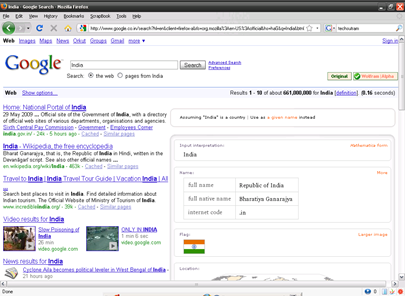
Below are Google search results for term “India” with Wolfram Alpha Google add-on in Firefox.

Google Search with Wolfram Alpha Google Addon in Firefox

Observe that on right side of Google search results all information is displayed pertaining to India.

Currently the way results are retrieved from WolframAlpha is bit slow. However, considering that Wolfram Alpha Google is just a initial version of this add-on, it will hopefully improve its performance in future.

Wednesday, May 27, 2009

MSDN: Security Virtual Labs

Bookmark and Share

Learn security concepts from MSDN security virtual labs for free,

+ MSDN Virtual Lab: Microsoft SDL: Developer Starter Kit: Buffer Overflows
+ MSDN Virtual Lab: Microsoft SDL: Developer Starter Kit: Code Analysis
+ MSDN Virtual Lab: Microsoft SDL: Developer Starter Kit: Compiler Defenses
+ MSDN Virtual Lab: Microsoft SDL: Developer Starter Kit: Cross-Site Scripting Vulnerabilities
+ MSDN Virtual Lab: Microsoft SDL: Developer Starter Kit: Fuzz Testing
+ MSDN Virtual Lab: Microsoft SDL: Developer Starter Kit: Security Code Review
+ MSDN Virtual Lab: Microsoft SDL: Developer Starter Kit: Source Code Annotation Language
+ MSDN Virtual Lab: Microsoft SDL: Developer Starter Kit: SQL Injection Vulnerabilities

Though these labs are specific to Microsoft Technologies, concepts are equally applicable to any programming language.

These are direct links to few security labs only. Find here all Security Virtual Labs.

IIS: A dedicated portal

Bookmark and Share


I have found a very useful portal, http://www.iis.net, on Internet Information Services,

+ Advanced Technical Articles
+ Tips and Tricks
+ Downloads etc…

http://www.iis.net is a official Microsoft IIS site.

Tuesday, May 26, 2009

Project Vector: A Java App Store

Bookmark and Share

Sun is coming up with a Java App Store, where developers will able to submit application for free or fee terms to Java audience. Sun will charge some fees for distribution and estimate that their audience will be in a billion.

Below is embedded video of Jonathan Schwartz explaining these details.

Read original blog entry at Jonathan Schwartz’s blog.

BgInfo: Display system info on your desktop

Bookmark and Share

If you are a administrator or software test engineer or any professional who deal with bunch of system everyday then you might find this post useful.

Every time we land on the system, we spend considerable amount of time to dig into system configuration. This is especially a case with virtualization where each image could have its own configuration.

Now there is a way to circumvent this situation using a nifty tool called BgInfo from Sysinternals (Now part of MS). BgInfo displays whole lot of customized information on your desktop such as computer name, IP address, logon server, boot time, registry values, file versions etc.

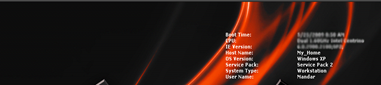
BgInfo Desktop

Image above displays small snap [this will save page load time] of my desktop with few attributes set for BgInfo.

For more details on BgInfo visit http://technet.microsoft.com/en-us/sysinternals/bb897557.aspx.

Download BgInfo from here.

Modern Warfare 2 Worldwide Reveal Trailer

Bookmark and Share

Just enjoy…

Monday, May 25, 2009

Mozilla Jetpack: A next step to extend Mozilla Firefox browser

Bookmark and Share

Mozilla Labs has started a new project called Jetpack. Basically Mozilla labs Jetpack is a API for writing Firefox add-ons.

It will try to simplify the process installing or removing or extending or updating Firefox functionality without restarting the Firefox browser.

Below is introductory video of Mozilla Labs Jetpack.

Checkout guiding principle at https://jetpack.mozillalabs.com/

Saturday, May 23, 2009

Weekend updates?

Bookmark and Share

On this weekend, there will be few guests visiting my home. So I may or may not able to update my blog on this weekend.

Meanwhile visitors can checkout label cloud “TechSutram Cloud” on right side of this post to find some of the interesting posts.

Thanks for visiting.

Friday, May 22, 2009

Google chrome runs 30% faster compared to its current version

Bookmark and Share

Google chrome has just become more faster. They have released updated version of JavaScript engine V8 that enhances its performance far better than existing one.

How fast? I have tested it using V8 Benchmark Suite - version 4 and here are the results for Mozilla Firefox 3.0.10 and Google chrome 2.0.172.28…

V8 Benchmark Suite - version 4 on Mozilla Firefox 3.0.10

V8 Benchmark Suite - version 4 on Google chrome 2.0.172.28

As you can see Google chrome 2.0.172.28 score beats Mozilla Firefox 3.0.10 in raw JavaScript performance benchmark. Google chrome will also contain support for extensions in future. So stay tuned for Google chrome updates.

As of now, following is the list of features that are accommodated in latest Google chrome update,

+ Improved New Tab Page
+ Full Screen Mode (F11)
+ Form Auto fill

Following video demonstrate just that,

They have already fixed more than 300 bugs issues. If Google chrome is already installed on a machine then it will be updated automatically to accommodate these changes else download Google chrome from http://www.google.com/chrome

Thursday, May 21, 2009

Quake: Now play it live!

Bookmark and Share

Gone are the days of downloading and installing MB(s) of Quake game on your computer.

QUAKE LIVE is an innovative browser-based multiplayer game. QUAKE LIVE can be played online at http://www.quakelive.com. Just register online and join the queue to play Quake game free. However, there is one small catch. In order to play this game, player needs to download small Quake browser plug-in, but it is hardly around 4MB.

QUAKE LIVE is 100% free-to-play premium first person shooter, encompassing more than 30 arenas. It has five game modes and more than 50 characters to play with, and everything from a web browser.

image

So what are you waiting for? Login to http://www.quakelive.com.

Wednesday, May 20, 2009

Glimmer – A visual jQuery Designer

Bookmark and Share

Can you imagine generating mind blowing effects without writing a single line of code?

Welcome to Glimmer.

Its really cool in the sense that Glimmer allows anyone to generate different effects for a webpage without writing single line of code. In short Glimmer makes power of jQuery accessible through a visual tool.

I have embedded a short video from http://visitmix.com/lab/glimmer. Download Glimmer and visit http://visitmix.com/lab/glimmer to check out few samples.


Get Microsoft Silverlight

Facebook: Add Creative Commons badge on your profile

Bookmark and Share

We often share contents on knowingly or unknowingly on social networking sites such as Facebook. Now we can apply license to all the contents available on Facebook profiles including photos, videos and everything that you do on Facebook.

Creative Commons has released Creative Commons License Application for Facebook. It will place Creative Commons badge on Facebook profile.

Facebook : Creative Commons badge

So whatever you post on your profile is covered under Creative Commons. At least displaying Creative Commons badge on Facebook profile will make someone think before utilizing content from your profile.

So what do you think about  Creative Commons Application?

Gmail: Translate your email messages on the fly

Bookmark and Share

There is another new feature rollout from Gmail labs. This time they integrated language translation right into your inbox. This will allow Gmail users to translate their email messages between 41 languages. There is update on Gmail blog.

To enable this feature, navigate to Gmail labs Tab and enable “Message Translation” (See below).

Gmail Labs: Message translation

In order to test this feature, I copied some Spanish text from web and sent an email to myself.

Gmail : Translate this message

When email is opened, it displays “Translate message to: XXXX” link if “Message Translation” is enabled and based on Language preferences (See Gmail settings) of user it will translate message to preferred language. In my case, my default Gmail Language preferences set to English. So it was displaying “Translate message to: English” link to translate my Spanish text message to English language.

Gmail : Message Translator translated message

So main advantage of this technology is that now Gmail users will able to send email messages in their preferred languages without worrying about language that their readers understand. Though this is a cool feature, I personally found that language translation from Google is not as natural as it would be if done using human translator. But I think the technology will eventually mature in coming days or future and help cross language barrios at least on the web.

So what do you think about this feature?

Tuesday, May 19, 2009

Thinking of improving collaboration with Office suites? – Part 1

Bookmark and Share

This is the first part of series of articles, “Thinking of improving collaboration with Office suits?”, explaining one of the ways to collaborate online using MS Office 2007. We are using Office as it is one of the most widely used application suits across the globe. (You have right to disagree :))

In this post we will see Microsoft Office Live workspace. I know this is something old one but still I am covering it in first part of this series. So here we go,

+ Office Live workspace

Office Live Workspace

Windows Live services offer lot of useful tools right from Messenger, Mail, Writer, Photo Gallery, Movie Maker beta, Family Safety, Toolbar etc. One of the additions to it is Office Live workspace. There are lots of benefits of using MS Office Live workspace.

Office Live workspace allows anyone to access and share files from anywhere. It also allows saving over 1000 Microsoft Office documents online and working with Microsoft Office Word, Excel, PowerPoint and Outlook. Even it allows users to share view online while working on the documents. And all this come at free.

Office Live Workspace : After Login

In order to use Office Live Workspace with MS Office 2007, download and Install Office Live plug-in. That’s it!

Now open Word 2007 and navigate to “Open from Office Live”. As I have already logged into Office Live Workspace, we can see all workspaces that already exist under my account.

Office Live Workspace: Open Office Live from Word 2007

Office Live Workspace: Open Office Live Workspace from Word 2007

If we compare all workspace details (in images) above so one can easily get the idea of how these documents can be shared using Office Live Workspace.

Online collaboration is made possible by giving proper permissions and maintaining version control for each shared document.

Below are few videos embedded from http://ask.officelive.com


In next part of this series, we will see how Google Docs are useful for online collaboration with Office suites.

Monday, May 18, 2009

Virtual WiFi (VWiFi) and Windows 7

Bookmark and Share

+ What is Virtual WiFi (VWiFi) and how it can be used?

Virtual WiFi is a technology that virtualizes wireless network card (WLAN) on your PC or laptop. Using Virtual WiFi, user will able to configure virtual WLAN cards (Virtualized out of physical WLAN on machine) to connect to different wireless networks or wireless Access Points.

This is similar to virtual network cards (vmnet0,vmnet1 etc…) that will be created if your have installed VMware Server on your Windows box.

Another advantage of Virtual WiFi (VWiFi) is Self Organizing Wireless Mesh Networks.

+ How to enable Virtual WiFi (VWiFi) functionality?

This feature will be available in Microsoft’s upcoming OS Windows 7.

Get all the VirtualWifi papers and presentations from http://research.microsoft.com/en-us/um/redmond/projects/virtualwifi/documents.htm. A general FAQ is also available.

Not all wireless network cards support this feature as vendors will need to recompile drivers to support Virtual WiFi (VWiFi) feature. Download PowerPoint presentation, “Wireless LAN Enhancements In Windows 7″aimed for hardware vendors from Windows Hardware Engineering conference 2008 (WinHEC 2008)

Sunday, May 17, 2009

Generate sequence diagrams on the fly

Bookmark and Share

http://www.websequencediagrams.com

I found easiest way to create sequence diagram,
http://www.websequencediagrams.com/
.

Just type in your description for your sequence diagram. One of the easiest alternative to Microsoft Visio and its free.

http://www.websequencediagrams.com

So what do you think of this online UML tool?

Saturday, May 16, 2009

Entrepreneurs can change the world

Bookmark and Share

Fantastic inspiring (and motivating) video for Entrepreneurs by Grasshopper.com

Just enjoy the best.

Google Blog Search advances further

Bookmark and Share

I know most of the people know what blog or weblog means. However, there are lot of people who don’t know much about a blog or blogging. They only know a website like www.yahoo.com, www.google.com etc… So here is small video from commoncraft explaining Blogs in Plain English.

In my opinion, there are two primary blog searches available on web. One is Technorati and other is Google blog search. Till now there was no match for Technorati for blog search. Google blog search is less known to the people unlike Google search. Now Google has made few improvements in their blog search service and likely to give tough fight to Technorati, not immediately but in future.

Though their are no official announcements about Google Blog search, Google tells Search Engine Land that it’s made several improvements under the hood of Google Blog Search. The post that breaks story and gets a lot of links is more likely to become the lead story on Blog search.

A quick search for “TechSutram” on http://blogsearch.google.com lead to immediately listing current posts on http://www.techsutram.com

image

Read original post here.

WolframAlpha launch update

Bookmark and Share

WolframAlpha will try to go live on 15th May 2009 @ 7pm CDT (8pm EDT | 5pm PDT | 12am UTC) as per WolframAlpha blog update.

“If all goes well, we’ll then be able to declare Wolfram|Alpha officially launched on Monday, May 18.”, WolframAlpha blog update says.

There will be live webcast at http://www.justin.tv/wolframalpha

Linux Ads you don’t want to miss

Bookmark and Share

Just watch and enjoy.

RedHat Linux Commercial
IBM Linux Commercial

Just watch and enjoy.

Friday, May 15, 2009

Portable Ubuntu on Windows

Bookmark and Share

In my previous post, Bash environment on Windows: This is not Cygwin, we had seen one of the ways to run BASH shell on Windows.

Now this time we will try to run Ubuntu (Portable Ubuntu) on Windows XP. In order to install Portable Ubuntu, download it and run the executable.  That will extract the distribution to some folder (specified by user).

I have extracted it to “H:\Portable_Ubuntu” folder…

Portable Ubuntu : Extracted on local drive

and executed “run_portable_ubuntu.bat” file. 

Portable Ubuntu : Run "run_portable_ubuntu.bat"

It will launch Gnome desktop with side-bar by default at top. I just moved it at the bottom. See Portable Ubuntu in action below. Its updating online…

Portable Ubuntu : Running update wizard

System drive is mounted at ‘/mnt/C’ by default.  All other favorite Linux/Unix softwares can be right into Windows environment without rebooting into other environment. 

Portable Ubuntu : Access C Drive

One of my favorites is “screen”, a terminal multiplexer and its works smoothly. So how do you run Linux and Windows simultaneously? Share your views in comments below.

Create Solaris Zone quickly

Bookmark and Share

+ What is zone and container?
Solaris zone is a virtual operating environment that provides isolated and protected environment for running an application and when Solaris zone uses system’s resource management facility it is called as “Container”.

+ On which Solaris platform zones are supported?
Zones are supported on OpenSolaris and Solaris 10 onwards...

+ How to create Solaris zone?
Here are quick steps to create Solaris local zone…

#mkdir /zones/local-zone
#chmod 700 local-zone
#pooladm –e
#pooladm –s
#pooladm
#poolcfg -c 'create pset PSET_zone (uint pset.min=1; uint pset.max=1)'
#poolcfg -c 'create pool POOL_zone'
#poolcfg -c 'associate pool POOL_zone (pset PSET_zone)'
#pooladm –c
#pooladm
#zonecfg -z local-zone
zonecfg:local-zone> create
zonecfg:local-zone> set zonepath=/zones/local-zone
zonecfg:local-zone> set autoboot=true
zonecfg:local-zone> add net
zonecfg:local-zone:net> set address=<IP-Address>
zonecfg:local-zone:net> set physical=bge0
zonecfg:local-zone:net> end
zonecfg:local-zone> set pool=POOL_zone
zonecfg:local-zone> verify
zonecfg:local-zone> commit
zonecfg:local-zone> exit
#zoneadm -z local-zone install
#zoneadm -z local-zone boot
#zlogin -C local-zone

These are basic steps to get local zone running on Solaris box. For more details on Solaris zones and containers, download or read System Administration Guide: Solaris Containers-Resource Management and Solaris Zones.

Thursday, May 14, 2009

Migrating to Gmail just got more easier

Bookmark and Share

For those who want to migrate from your existing email id (other than Gmail) to your Gmail email id, migrating to Gmail has just become more easier and powerful.

AFAIK, for the first time any email service provider is providing such a useful feature. Now Gmail users will able to import not only contacts but also emails from your existing email account.

Emails can be imported from Yahoo, Hotmail, AOL and others (more than 40+ different email service providers). This is significant as Google has huge SaaS (Google docs, Gmail, Google Apps etc.) infrastructure already in place and providing such migration feature will attract more users from other service providers. This will also help increase value of other services such as Google calendar, Google docs etc.

Currently this feature is available to newly registered Gmail users and eventually it will be rolled out to existing users but slowly as per Gmail blog.

I have tried to import my Hotmail account to Gmail account . In order to import other account emails and contacts, navigate to “settings=>Accounts and Import tab” as depicted below.

Gmail : Importing Hotmail Account

Gmail : Importing Hotmail Account: Finish screen

It seems Gmail will take some time (several hours to 2 days) for import operation to complete.  So I have to wait for some time to successfully import my contacts and emails from my Hotmail account.

So are you planning to migrate to Gmail from your existing email account? Let me know your opinion in comments below.

Bash environment on Windows: This is not Cygwin

Bookmark and Share

If you are a Linux/UNIX guy and are forced to use Windows then you may find this post useful. Linux/Unix guys use windows due to many reasons. One of the reasons is Microsoft Outlook. This is must have for me and there is no application that can take its place in Enterprise environment.

Today, we will try to setup bash environment of Windows XP. If command prompt is launched then it user should able to change his/her default shell to bash shell and should able to execute generally used Unix tools.

There are few software packages that need to be downloaded.

1. Download bash-203.zip and extract it to “c:\bash”

2. Now download Native Win32 ports of some GNU utilities to “c:\temp\UnxUtils”

Now copy all files from “c:\temp\UnxUtils\usr\local\wbin” to “c:\bash”. It should look like this,

BASH directory on windows

Now add “c:\bash” to global PATH environment variable as below,

PATH Environment variable on Windows for bash

On windows, we can also add “HOME” environment variable which will be passed to bash shell.

Once PATH variable includes “c:\bash”, launch Program=>Accessories=>Command Prompt and type in “bash”.

Bash environment is ready on windows. All bash shortcuts will also work as equally as on Linux.

I also know that there could be other ways to get this work done on windows. If you use this or similar technique then let me know your experience in comments below.

Wednesday, May 13, 2009

Google advances search using “Search Options” feature

Bookmark and Share

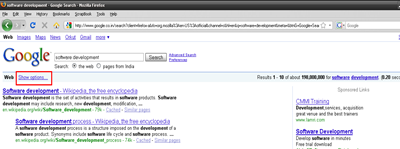
If you have Googled recently then your might have found extra Search Option on your search results page (marked in red below)

Google Search: Search Options link

If you click on “Show Options” link then it will expand into “Search Options” panel that can be used to fine tune Google search results (marked in red below)

Google Search: Expanded Search Options panel

The “Search Options” panel helps classify results based on their type (video,forum,reviews) and recency (past 24 hours, week and year). Video below explains few details of the new Google “Search Options” panel.

Google Search Options

One of the cool features in Google “Search Options” panel is Wonder Wheel, a visual representation of Google search results.

Google Search Options: Wonder Wheel for "Software Devlopment Life Cycle pdf"

At the time of writing this post, Wonder wheel was not available on “http://www.google.co.in”.  In order to try this feature, navigate to “http://www.google.co.in” and press “Go to Google.com” link.

Another advancement is improved Google snippets. From now on Google snippets will contain more information such as stared reviews, number of reviews, price range etc. To provide these rich snippets, web master has to submit details to Google.

So what do you think about new Google Search Options?

Tuesday, May 12, 2009

Another blog is already hosted at this domain – Blogger.com

Bookmark and Share

This article is a way to share my experience when I purchased my custom domain from Blogger or Google (Using Blogger dashboard). The advantage of purchasing through Blogger is that it will configure all DNS settings and Google Apps for your domain automatically.

However, after purchasing my custom domain (techsutram.com) through Blogger, I navigated to Blogger dashboard=>Settings=>Publishing to setup my blog with my custom domain. However, when I tried to save custom domain settings, following message was flashed.

“Another blog is already hosted at this domain”

I was surprised to see this message as it was expected that Blogger would take care of all issues while setting up custom domain and that was the primary reason I purchased custom domain through Blogger dashboard.

I also verified Advanced DNS settings from Google Apps dashboard (after registering custom domain through Blogger dashboard, email is received from Google Apps team containing URL for configured Google App for custom domain). Everything seemed to be correct. So where was the problem?

When I tried to type my custom domain URL in address bar of web browser then it redirected me to Google sites. After thinking for an hour and reading context of message displayed above (in red), I concluded that some other service was configured at the same address.

Hence, I logged into my Google Apps dashboard and observed that Google “sites” service was added by default. Considering custom domain URL was redirecting to Google sites, it made sense to me to remove Google “sites” service from my Google Apps dashboard (of my custom domain).

After removing Google “sites” from Google Apps dashboard, I again navigated to Blogger dashboard=>Settings=>Publishing and further navigated by pressing switch to “Custom Domain” link.

Blogger dashboard=>Settings=>Publishing : switch to Custom Domain

Now, after typing my custom domain in text box displayed after pressing “Custom Domain”, click on the link “Already own a domain?” called  “Switch to advanced settings”.

Blogger.com: Advanced settings

Now type custom domain name in a text box called “Your Domain” and try to “Save Settings”. And everything goes perfectly well without any errors.

Try to navigate to your custom URL using web browser and your blog should be reachable using custom domain name.

All these steps worked for me before 2 months. However, I am sure that there must be another way to resolve this issue. If you have that another solution then let us everyone know in comments below.

Perl and PHP side by side comparison

Bookmark and Share

A useful side by side comparison of PERL and PHP languages created by Dr. Robert Kline of West Chester University.

It  is useful as a quick reference guide for coders who work on both PERL and PHP scripting languages.

Cloud Anti-virus explained: A Video

Bookmark and Share

After so many posts about cloud computing, here is another video explaining not only about cloud computing but about Cloud Anti-Virus.

Last month Panda security had released industry’s first Cloud Anti-virus. It is currently available as free download from http://www.cloudantivirus.com. However, as it is a cloud based anti-virus, computer needs to be online (connected to Internet) in order to work it correctly.


Technology