Monday, March 30, 2009

BLOGSPOT : Feedburner feeds are not updating

Bookmark and Share

Today I had faced very strange problem with feedburner feeds. I had a new post on my blog and things are not reflecting on feedburner URL.

I had tried lot of things right from Google search to “pinging feedburner” and “Rsync Now” on feedburner troubleshoot page below. But no luck.

Feedburner Troubleshoot 1

image

So you might ask why am I writing such post? Answer is simple. It solves two purposes. I just want to verify that feeds are being updated indeed and other is that it might help someone else to troubleshoot such issue.

So here is what I did to solve this issue. These steps worked for me and may not work for everyone else. It is only for reference.

1. Go to feedburner troubleshoot page and try all steps before continuing.

2. If step-1 fails then go to blogger’s settings->Site Feed->Clear text box “Post Feed Redirect URL” and Save Settings

3. Now navigate to your blog address and try to see Atom Feed or “http://<yourblog>.blogspot.com/feeds/posts/defaultddress” and see if new updates are visible

3. In my case, all updates were visible

4. login to feedburner and nevigate to Optimize->Your Feed and see if new blog updates visible

5. If updates are available then login to blogger and restore your feedburner settings.

6. That is it. All the best.


Windows Explorer Alternative: ExplorerXP

Bookmark and Share

This is new post after a long gap.
Well this may not be so shiny post. However, I am posting this as I find it really useful in day to day use.
Reason is simple. Using default windows explorer, we can only see file size in details views. However what if you want  to see folder size collectively. This will be specially useful while cleaning up your hard-drive (System drive?) .

Few of its features are its small footprint, tabbed interface and folder size in its default view.

Their official site is http://www.explorerxp.com/

Their could be many such alternatives available. You guessed it right, this on is my favorite and hence is the post.


Tuesday, March 24, 2009

Cloud Computing: Anything as a service

Bookmark and Share

We have already seen what is cloud computing? and few Open source projects for cloud computing.

We are also aware of Infrastructure-as-a-service, Platform-as-a-service, Software-as-a-service that form part of cloud computing environment.

Few days back, while going through Amazon AWS blogs, I came across article Virtual Stress-free Testing in the Cloud. I thought it is worth mentioning some context of that article in my blog. In that article, author has listed few companies that provide software “Testing-as-a-service”. (I don’t want to list those companies here). I really found this concept, Testing-as-a-service, innovative as small and medium scale businesses can effectively benefit who either couldn’t afford  or don’t want to invest in IT infrastructure.

There are also players who provide “Data-as-a-service” and there are few players that provide Security-as-a-service”. As more and more people start to become part of cloud computing, they will be start looking for a security in cloud space.

So, yesterday I was thinking about possibilities of different services that could be offered as a part of cloud computing. So almost anything which we make part of cloud computing environment can be offered as service, I call it as Anything-as-a-service. Currently I am not aware if there are any other terminologies referring to this concept.

Its advantage new ventures, who don’t want to invest significantly on computing hardware and software applications.

So in my view, we are heading towards IT plug-and-play environment that will dramatically cause shift in IT business paradigm.  Just place the order and it will be served to you (in few minutes).  :)


Monday, March 23, 2009

Easy XAMPP(P) Development environment

Bookmark and Share

You must be surprised to see title of this article and may be thinking what is so special about XAMPP(P)?

So hold on to your curiosity and you will see how it is easy to deploy this whole setup for Apache, MySQL, PHP, Perl and Python, FTP server, Mail server and other components in few minutes on windows.  Yes, you read it correctly.

So XAMPP will install followings,

“Apache, MySQL, PHP + PEAR, Perl, mod_php, mod_perl, mod_ssl, OpenSSL, phpMyAdmin, Webalizer, Mercury Mail Transport System for Win32 and NetWare Systems v3.32, Ming, JpGraph, FileZilla FTP Server, mcrypt, eAccelerator, SQLite, and WEB-DAV + mod_auth_mysql. “ (Text snip from here.)

Interesting isn’t it?

Same steps will be also applied to Linux as well except for few CLI.

Before proceeding further let me underline few facts. The deployment that we will discuss is not for production use. It is solely for integrated development. This allow us to get started with our development efforts rather than looking at setup details.

You can download XAMPP from http://www.apachefriends.org/en/xampp.html.

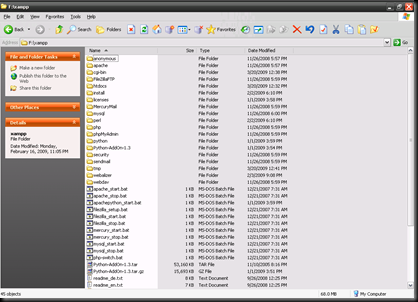
Once you download it just extract it to a folder,

xampp_folder_view

search for “xampp-control.exe” file and it will popup XAMPP control panel.

xampp_control_panel_view

Start respective services and navigate to http://localhost and we are done :)

xampp_web_view 

You can also see link to phpMyAdmin in your lower left pain on your box.

In order to support Python on your XAMPP, download and install Python add-on from http://sourceforge.net/project/showfiles.php?group_id=61776&package_id=113693


Friday, March 20, 2009

Open Source Cloud Computing

Bookmark and Share

In my previous article, we had discussed few aspects of Cloud computing.
Now we will see few open source projects for cloud computing.
Below is list of few which you might find useful,

+ Apache Hadoop Core
+ EUCALYPTUS
+ Enomaly Elastic Computing
+ eyeOS – This one is interesting if you want to try out Web OS on your PC or laptop. I could able to deploy it and got it working in few minutes.

I personally didn’t try out first three. Let me know ( drop your comments below) your experience if you get a chance to work on these.
A quick search on sourceforge.net lead to healthy results.


Wednesday, March 18, 2009

Cloud Computing

Bookmark and Share

Nowadays, we constantly hear buzzword, “Cloud Computing”. We will try to dig this term the way I understood in a hope that someone might find it useful. :)

Before proceeding further lets limit the scope of this article. We are not going to debate if there exists cloud computing or not…

If you have any comments and suggestions feel free to drop your comments.

+ What is Cloud computing?

IMO, Cloud computing is a IT abstraction on internet that provides on-demand provisioning of different resources based on SLA.

From user’s/customer’s perspective, it is a black box where we deploy our application and forget managing required IT infrastructure for our app to run that might contain application services, storage services, processing/computing power, bandwidth etc.

So we don’t need to worry about CAPEX in future. This will allow us to concentrate more on our business rather attending IT infrastructure, it may be software or hardware based on our application specific needs under cloud computing environment.

In order to estimate popularity of “Cloud Computing”, we can look at its Google trends. Statically, we can clearly observe “Cloud Computing" interest with exponential increase in the trend.

+ Why do we need Cloud computing?

It is bit tricky. Generally in Information Technology industry, new technologies arrive constantly. They start to provide significant advantages over old technologies. So most of the businesses start to accommodate with these changes into their business models and that will create its demand and eventually different vendors come into play to provide these services. Hope that explains a bit about it.

+ Where it is used and who provides cloud computing services?

There are many services available on internet. Few of them are,


Wednesday, March 11, 2009

Search and Replace across multiple files

Bookmark and Share

Most of us stuck at some point of time to replace a string in multiple files.

How do we do this? Write a few lines of code to do this job (or possibly a script). We have got perl to help us out to do this same task in single line..

# perl -pi -i.orig -e 's/scalar/vector/g' *.xml

If we fire this CLI in current directory then it will replace all occurrences of word ‘scalar’ to ‘vector’ in all .xml files while backing up all original ‘files.xml’ file and renaming them to ‘files.xml.orig’.

Saturday, March 7, 2009

NFS mount problem on Solaris 10

Bookmark and Share

We often face issue while mounting NFS exports from Linux (or any other OS, I guess) on Solaris machine. This is due to different versions of NFS protocols in between two machines.

In order to resolve this issue, we are required to modify one file.

1. Open /etc/default/nfs in your favorite editor

2. Search for “NFS_CLIENT_VERSMAX” or “#NFS_CLIENT_VERSMAX”. Its default value is set to 4

3. Uncomment this line and set its value to 3. Now it should look like,

NFS_CLIENT_VERSMAX=3

and that's it. We don’t need to restart any service for NFS mounting to work.


Friday, March 6, 2009

Firefox add-on(s) for software developers and testers

Bookmark and Share

I am listing out extension which I found useful during day to day software development and testing.
Feel free to add your comments to add any extension that you might find useful.

One liners are provided only against few extensions where it makes sense.

CLICK on each extension below to find out more about them.

+ Firefox Accessibility Extension 1.4.5.0 

+ Web Analytics Solution Profiler/Debugger (WASP) 1.10 – Extension for web analytics professionals

+ Molybdenum 0.6.5 - A web test tool. 

+ iMacros for Firefox 6.1.1.4 - Automate Firefox. Record and replay repetitious work

+ HackBar 1.3.2

+ YSlow 1.0.2 – Analyze web page based on Yahoo's rules for high performance web sites

+ Tamper Data 10.1.0

+ Greasemonkey 0.8.20090123.1

+ User Agent Switcher 0.6.11

+ Firebug 1.3.3

+ FirePHP 0.2.4

+ JavaScript Deobfuscator 1.5.3

+ IE Tab 1.5.20090207

+ Web Developer 1.1.6

+ Extension Developer 0.3.0.20080526

+ Codetch 0.4.1rc1

+ Regular Expressions Tester 1.1.6.12


Sunday, March 1, 2009

Differences IPv4 Vs IPv6

Bookmark and Share

I had compiled differences between IPv6 and IPv4 long back. Though it is for my personal reference I am uploading it on my blog. Hope someone might find this useful.

Thanks to those known and known sources who helped me compile this.

IPv4

IPv6

Addresses are 32 bits (4 bytes) in length. Addresses are 128 bits (16 bytes) in length
Address (A) resource records in DNS to map host names to IPv4 addresses. Address (AAAA) resource records in DNS to map host names to IPv6 addresses.
Pointer (PTR) resource records in the IN-ADDR.ARPA DNS domain to map IPv4 addresses to host names. Pointer (PTR) resource records in the IP6.ARPA DNS domain to map IPv6 addresses to host names.
IPSec is optional and should be supported externally IPSec support is not optional
Header does not identify packet flow for QoS handling by routers Header contains Flow Label field, which Identifies packet flow for QoS handling by router.
Both routers and the sending host fragment packets. Routers do not support packet fragmentation. Sending host fragments packets
Header includes a checksum. Header does not include a checksum.
Header includes options. Optional data is supported as extension headers.
ARP uses broadcast ARP request to resolve IP to MAC/Hardware address. Multicast Neighbor Solicitation messages resolve IP addresses to MAC addresses.
Internet Group Management Protocol (IGMP) manages membership in local subnet groups. Multicast Listener Discovery (MLD) messages manage membership in local subnet groups.
Broadcast addresses are used to send traffic to all nodes on a subnet. IPv6 uses a link-local scope all-nodes multicast address.
Configured either manually or through DHCP. Does not require manual configuration or DHCP.
Must support a 576-byte packet size (possibly fragmented). Must support a 1280-byte packet size (without fragmentation).

Network Sorcery is a great place to find RFC(s).

Refer to http://www.networksorcery.com/enp/protocol/ipv6.htm and http://www.networksorcery.com/enp/protocol/ip.htm links for related RFC(s) of IPv6 and IPv4 respectively.

Also there is good reference for Understanding IPv6 @ http://technet.microsoft.com/en-us/library/cc786127.aspx


Technology