We had already seen what is meant by SEO? in one of the previous posts. Google Webmaster Center blog has posted updated Search Engine Optimization guide.
It can be directly downloaded from this location.
We had already seen what is meant by SEO? in one of the previous posts. Google Webmaster Center blog has posted updated Search Engine Optimization guide.
It can be directly downloaded from this location.
Today’s (29th Sept 2010) Times of India newspaper features full page advertisement for Google Chrome browser on last page.
Here is a snap…
Microsoft’s Bing Maps augmented reality demo at TED. (few months old)
Original video at http://www.ted.com/talks/blaise_aguera.html

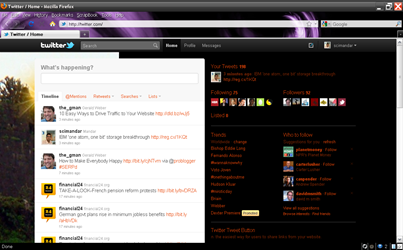
I just found out that twitter has rolled out a new preview for its users. Looks really promising.
Will it replace different twitter apps?
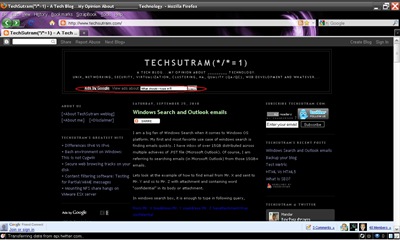
I have Google adsense link unit on top of my blog just below its main title. And today something strange happened. When I opened my blog http://www.techsutram.com , found some strange text box, marked in red oval shape in above image. I have entered few words in this text box “What should I type in?” and pressed submit button “>>” and redirected to list of ads matching to submitted phrase.
I am bit concerned because it is disturbing overall look of my blog. Has anyone faced similar kind of issue?
I am a big fan of Windows Search when it comes to Windows OS platform. My first and most favorite use case of windows search is finding emails quickly. I have inbox of over 15GB distributed across multiple achieves of .PST file (Microsoft Outlook). Of course, I am referring to searching emails (in Microsoft Outlook) from those 15GB+ emails.
Lets look at the example of how to find email from Mr. X and sent to Mr. Y and cc to Mr. Z with attachment and containing word “confidential” in its body or attachment.
In windows search box, it is enough to type in following query,
from:Mr. X toaddress:Mr. Y ccaddress:Mr. Z hasattachment:true confidential
That's it. Easy and effective.
Since this blog is hosted on blogger, I was looking for a way to backup this blog that is also supported by blogger platform. And while looking for different ways to backup blog contents, I finally found a way to backup my blog that is supported by blogger itself.
To backup your blogger blog on your hard drive,
1. Login to blogger dashboard and navigate to settings tab –> Basic tab
2. Inside Basic tab, observe that “Export Blog” option under “Blog Tools”.
3. “Export Blog” link will navigate you to “Export your blog” page. Press “Download Blog” button to download your blog in “Blogger Atom” (xml) format.
How do I import and export blogs on Blogger? link provides more information about how to import and export your blog on blogger platform.
Do you know any other technique to backup your blog on blogger platform? then let everyone know in comments below.
A lot has been said and written about test metrics. However, this particular post will stick to defining test metric.
+ So what is Test Metric?
Test Metrics are set of tools that help measure effectiveness of software testing processes. Measuring software processes is necessary for implementation of new software processes and/or for improvement in current set of software testing processes in any organization. So in order to identify and use test metrics, we have to first identify and freeze on software testing processes that we would like to measure.
Can you think of any other definition of test metric? Then let everyone know in comments below.
I was trying to understand basic differences of HTML5 against HTML (or HTML4 to be specific) and couldn't find exact information I was looking for. Hence I decided to compile it. Hope others will find it useful too.
| HTML | HTML5 |
| DOCTYPE is much longer as HTML4 is based on SGML-based. <!DOCTYPE HTML PUBLIC "-//W3C//DTD HTML 4.01//EN" | DOCTYPE is required to enable standards mode for HTML documents. |
| Audio and Video are not part of HTML4 specification | Audio and Videos are integral part of HTML5 specifications e.g. <audio> and <video> tags |
| Vector Graphics is possible with the help of technologies such as VML, Silverlight, Flash etc. | Vector graphics is integral part of HTML5 e.g. SVG and canvas |
| It is almost impossible to get true GeoLocation of user browsing any website especially if it comes to mobile devices. | JS GeoLocation API in HTML5 helps identify location of user browsing any website (provided user allows it) |
| Browser cache can be used as temporary storage. | Application Cache, Web SQL database and Web storage is available as client side storage. Accessible using JavaScript interface in HTML5 compliant browsers. |
| Web Sockets are not available. Generally used mechanisms are long polling and streaming. | Full duplex communication channels can be established with Server using Web Sockets. Accessible using JavaScript interface in HTML5 compliant browsers. |
| Works with all old browsers | Most of modern browser have started supporting HTML5 specification e.g. Firefox, Mozilla, Opera, Chrome, Safari etc. |
| Does not allow JavaScript to run in browser. JS runs in same thread as browser interface. | Allows JavaScript to run in background. This is possible due to JS Web worker API in HTML5 |
I am not expert in HTML5 and neither in HTML4 specifications. These are just few set of differences in HTML Vs HTML5 that I compiled for immediate reference. I am absolutely sure that there is much more to add to above text. If you find anything wrong in above differences or if you want to add something to above differences of HTML Vs HTML5 then feel free to drop in your comments below.
This post covers some of the basics of SEO. We will look into the term SEO by asking few general questions.
+ What does SEO stand for?
SEO stands for “Search Engine Optimization”
+ What is SEO?
SEO is a process or technique to optimize your web pages in a fashion so that it shows up into search engine queries possibly in top 10 results. Of course, it is not necessary to get into first top 10 results, however if it is not in top 10 or 20 results then your web page is virtually invisible to search engine users. You must have observed this when your search term in Google has returned few million results.
+ Why do we require SEO?
From strictly business point of view, it is required to get noticed on web out billions of websites or businesses. Unless people find you on web (using search engines) for whatever term they are looking for and your web pages doesn’t appear in search results, how will your business grow? So in order to grow your business, it is essential to perform SEO on web pages. More search engine optimized pages, more people will able to locate your business, i.e. more web traffic. Of course, this scenario may not be applicable for your existing customer base who can locate your website directly.
Hence SEO forms essential part of Search Engine Marketing or Internet marketing.
+ Who does SEO use?
It is employed by almost every popular site. It is implemented by all kinds of blogs, portals, and news sites and other. As said above, SEO forms essential part of SEM (Search Engine Marketing).
+ What are the types of SEO?
There are two kinds of SEO based on how they use different techniques to optimize web pages for search engines.
1. White Hat SEO – These are SEOs who use legitimate techniques as per search engine policies or guidelines.
2. Black Hat SEO – These are SEOs who trick search engines to show up their optimized web pages by violating search engine policies or guidelines.
What else do you think about SEO? You are welcome to drop your comments to add value to this post.
In my last post we saw “What is Flaw?” in a software. However, to complete differentiation between software Flaw Vs software Bug, below is description of software bug or defect.
Bug is a wholly accepted defect found in software caused by code not fulfilling agreed upon user requirements or acceptance.
Surprised to see title of this post! As you have guessed it correctly we are referring to Flaws in software. This is a small post just to differentiate Flaw from the Bug in software testing.
So what is Flaw?
Flaw is a similar to a Bug in a software till certain level. However, in my views, it is buried inside software design and gets implemented in code.
Do you have any other views for Flaw Vs Bug in software testing? then let everyone know in comments below.
I was looking for Operating System trends in current scenarios after few (?) acquisitions that we had seen in last 12 months. To gauge what is happening on the ground I turned to Google trends service and found some interesting shift in Operating Systems market. And below are the results.
+ HP-UX:
+ AIX:
+ SOLARIS:
+ LINUX:
+ Windows Server:
Note that I am not claiming anything. People are wise to make their own conclusions based on the search interests depicted in above graphs.
Try out different search terms in Google Trends to fine tune your results.
There are numerous articles about regression testing available. However, most of them do not address essential points about regression testing. Here is my attempt to address that gap by asking few questions.
+ What is regression testing?
+ Why do we require regression testing?
+ What resources do we need?
+ How to justify the cost of regression testing?
+ What to test as a part of regression testing?
+ Do we require separate test plan for regression testing?
+ Does our regression test suite really address changes gone into the product?
+ How are we going to track defects identified out of regression testing?
+ Are performance tests are part of regression test suite?
+ What is the cycle of execution for regression test suite? And when do we start performing regression testing?
+ Are there any customizations possible to the regression test suite? If yes, how do you plan/document those customizations?
+ Have we certified the regression test suite before proceeding?
+ Who is going to certify the test suite for your product? Have we identified all stakeholders?
+ Where are we going to store results of regression test runs (in case your product has different releases)?
*Disclaimer: The opinions expressed herein are my own personal opinions and do not represent my current or past employer's view in anyway. Because I value your thoughtful opinions, I encourage you to add a comment to this discussion. Don't be offended if I edit your comments for clarity or to keep out questionable matters, however, and I may even delete off-topic comments. The contents or posts ("DOCUMENT") may become invalid or irrelevant without any notification. Embedded Videos or Screencasts (if present) in any of the posts on this blog("techsutram.blogspot.com" or "techsutram.com") belong to their respective authors. The contents or posts ("DOCUMENT") on this blog ("techsutram.blogspot.com" or "techsutram.com") may contain links to sites that are not controlled by me. I do not endorse contents of those linked websites. Any kind of material or content submitted to this blog in any form (email, web based forms etc.) may or may not be altered, changed, modified, summarized, or replaced for any reason including no reason before publishing. I understand that copyright notice is not explicitly required. Still for sake of completeness, here is a copyright notice This blog contents or posts ("DOCUMENT") may have exposure to computer/network security and are posted purely for educational purpose only. This blog and any of its contents or posts ("DOCUMENT") is provided "as is", without warranty of any kind or fitness for a particular purpose,either expressed or implied, all of are hereby explicitly disclaimed. In no way can any author of this blog, scimandar/Mandar, or the techsutram ("techsutram.blogspot.com" or "techsutram.com") blog ("AUTHOR") be made liable for any damages that are caused by this "DOCUMENT". You are using this "DOCUMENT" at your own risk!